




Instant access to banking on smart phones has arguably increased coordinated fraud, scam and impersonation theft when transferring and checking accounts in public, posing a safety concern.
Sort code and account numbers are used to set up unauthorised direct debits, create fraudulent checks and carry out phishing scams.
Jeremy Clarkson has publicly tested this in the past by intentionally providing personal banking details on the newspaper.
“Clarkson, 47, writing in his column in the Sunday Times, decried the furore last year after CDs disappeared containing the banking details of 7 million families.
The loss led to fears of mass identity theft with people's bank accounts open to internet scams.
At the time he wrote: "I have never known such a palaver about nothing. The fact is we happily hand over cheques to all sorts of unsavoury people all day long without a moment's thought. We have nothing to fear."
However, yesterday he told readers he had opened his bank statement to find a direct debit had been set up in his name and £500 taken out of his account.
The charity is one of many organisations that do not need a signature to set up a direct debit.”
Source: https://www.theguardian.com/money/2008/jan/07/personalfinancenews.scamsandfraud - 2008 Jan 7th
The behaviour shows minimal to no concern with the details being available but after the fact it is accepted to be an issue. It’s not viewed as a threat, which is the issue.
I explored a feature design that hides private information by default and makes it accessible and flow naturally.
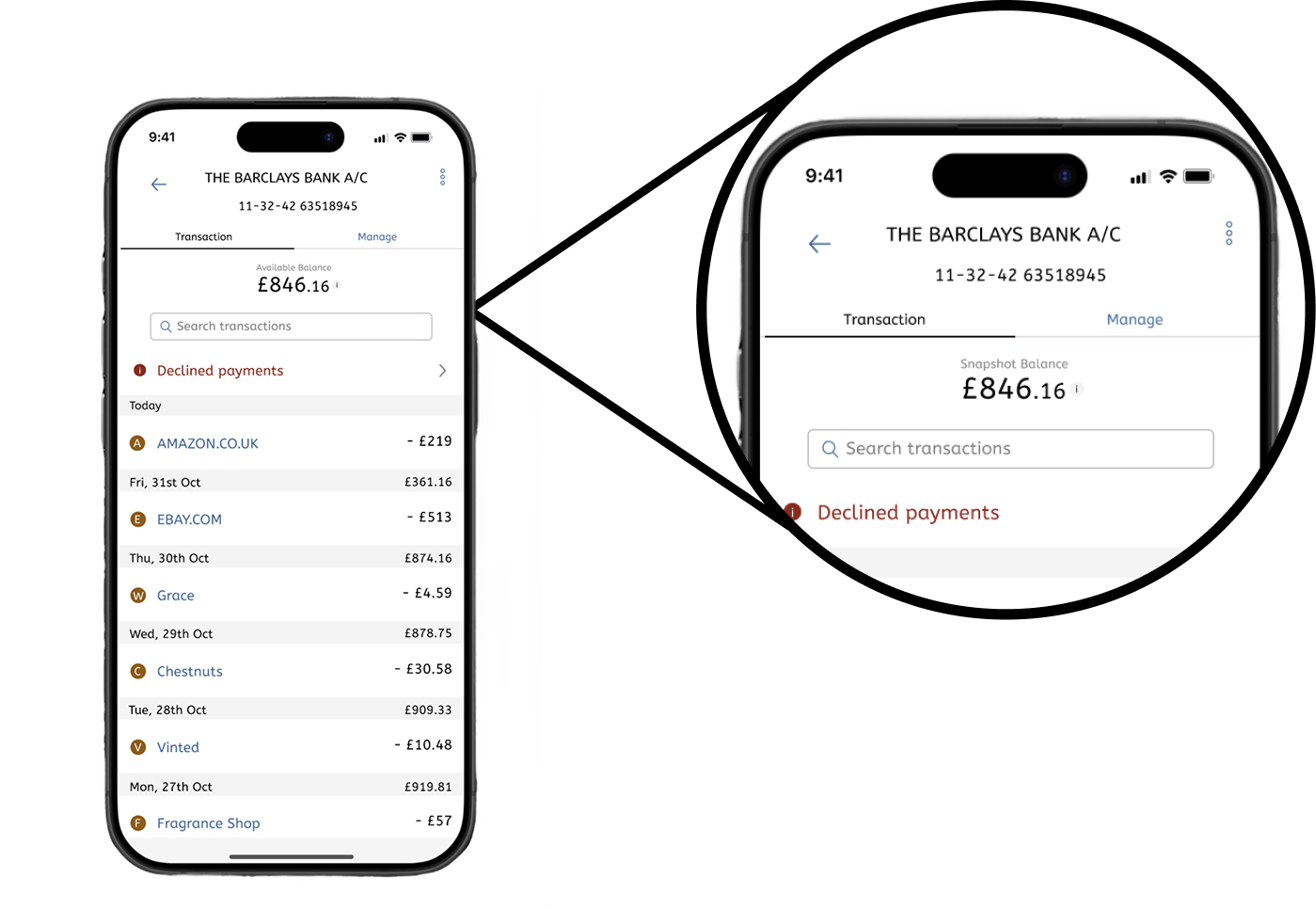
Currently Barclays display this information readily after signing-in to the app and viewing transactions - with concerns for Privacy, security perception and fear of public exposure.
I spoke with a small sample of users that actively use the app in public.
“Just checking my balance quickly”
“Looking at recent transactions”
“Sending money sometimes”
“Making sure I got paid”
“I don’t stay on it long, just quick checks”
Insight: Carrying out varied tasks in Public.
“Yeah a bit, especially on the train”
“Not really, I don’t think about it”
“Only if someone is really close”
“I guess it could be risky but I don’t worry too much”
“I understand it’s sensitive information but I overlook it”
Insight: Some concerns but not too panicked and awareness varies.
“Yeah I angle my phone sometimes”
“Not really, never had an issue”
“Only when checking something important”
“I turn the brightness down so it’s harder to see”
“If someone’s next to me I turn away”
Insight: There is some behaviour change although subtle.
“Yeah that sounds useful”
“Could be nice actually”
“I probably wouldn’t use it all the time”
“Depends how easy it is to turn on/off”
“Maybe, but I don’t want to faff with it”
insight: Reactions are positive but not a must-have feature
“Safer, but only if it’s quick to reveal”
“I don’t want extra steps every time”
“If it slows me down, I wouldn’t use it”
“Good idea, just don’t make it annoying”
“Seems okay, I don’t open it to check those details in public”
Insight: The system needs to be convenient and not slow the user.
Based on the user interview insights, there is some concern but a lack of awareness of the issue. The feature would reduce concern and stabilise user behaviour but it has to integrate smoothly, be convenient without interfering with the users daily tasks.
The feature is validated by the user. In addition to this we consider the bank’s needs of user safety, data safety and alleviate burden on fraud and security departments by tackling one of the many ways personal data can be taken early on within the life cycle.
Following the brand guidelines and app design, the feature is simplified and is shipped as an add-on to the existing system for Barclays banking app
Customers are opening their banking app in public spaces posing a safety concern.
Hide bank information whilst keeping it accessible to the user.
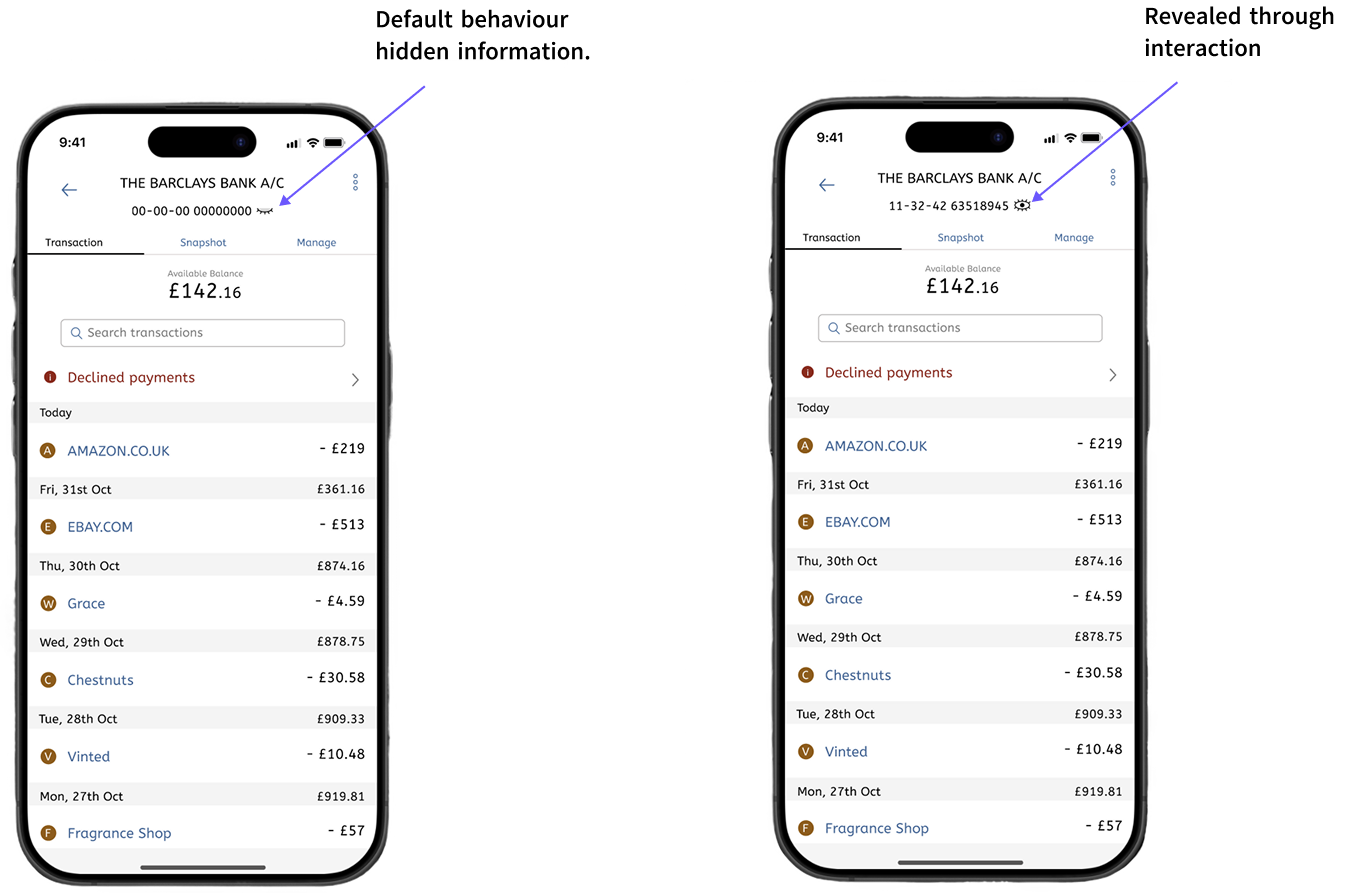
The first implementation for this feature update is very straight forward having the feature be always turned on by default preventing the data to be accessible to onlookers and the user upon opening transactions.
The feature will use a toggle to switch states between hidden and show when the user interacts with the details through tapping the detail area.
The design uses expected place holder digits applying formatting of the numbers accordingly - 00-00-00 00000000 allowing the user to infer and hint at the details. This feature would be familiar to already existing customers as they will recognise the formatting from prior usage of the app and the positioning of it.
This implementation, although it’s very safe, could also be a hindrance or a nuisance to the user as the information is always hidden and for those using their banking apps at home or safe spaces it will be more of an annoyance and unnecessary addition than helpful.
The second implementation of this feature would utilise geolocation to detect and hide the information accordingly.
Users of the Barclays banking app are required to provide their home information during account setup and update it after they move homes per the policy.
The geo-fencing would be applied to their abode and if the user is interacting with the app outside of it, the information is automatically hidden. The implementation aims to reduce the frequency and remove unnecessary use of the feature when the user is detected to be within a safe space. This responds directly to the feedback the users have provided regarding the new feature to be an inconvenience but a positive add-on during their daily usage leading to further reduction of friction at home.
Implementation 2 has a few draw backs. The users that are more centrally located near amenities won’t get the full benefits due to the minimum distance required and it’s not always guaranteed to be accurate.
Based on the trade-offs I selected implementation 2 because it provides a better balance of privacy and usability. While implementation 1 offered stronger security, it introduced additional friction that could discourage frequent use. Implementation 2 prioritises perceived security while keeping interactions fast and lightweight, which aligns with how users typically use banking apps and doesn’t add an additional interaction to the flow.
Going forward the solution would need to be validated with usability testing. An additional test can be added within the app for taps that reveal information when the user is outside, which would provide further quantitive insight into user activity for sort-code and account number. The project demonstrates how small thoughtful features can improve user trust in finance products without compromising usability.